Are you a blogger trying to write faster? A marketing manager who needs fifty ad variations by Friday? A student who wants help without getting caught cheating? A non-native English speaker who just wants to sound natural and confident?
The tool that’s right for one of those people is genuinely wrong for another.
This guide is different. Instead of ranking AI writing tools by features or price, we’ve ranked them by use case — by who you are and what you actually need. No filler. And no affiliate fluff. Just honest recommendations that fit your specific situation.
The Three Types of AI Writing Tools
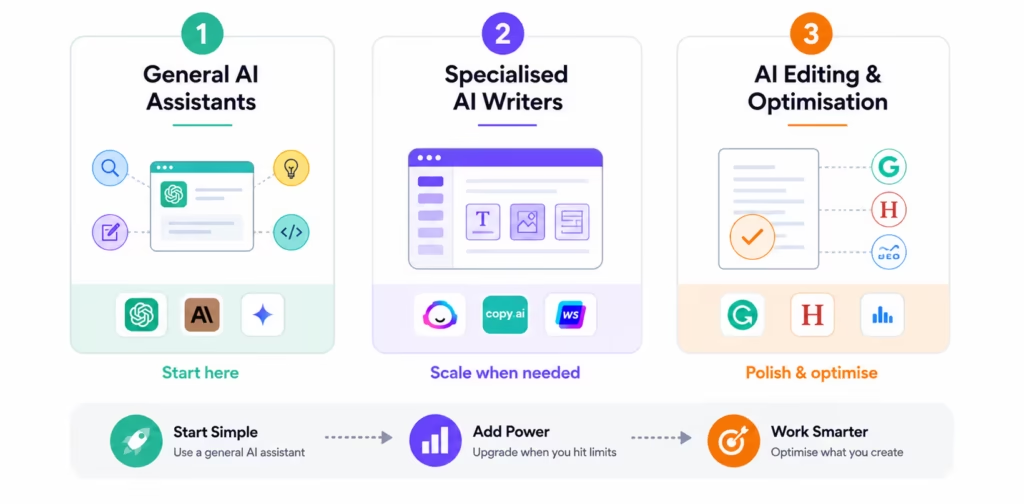
Not all AI writing ai tools are the same. There are three fundamentally different categories, and many people buy the wrong one because they don’t know the distinction exists.
The biggest mistake people make is jumping straight to a paid specialised tool when a free general AI assistant would’ve done the job just as well. Let me break down what each category actually does and who it’s actually for.
| Category | What It Does | Best Examples | Who Needs It |
|---|---|---|---|
| General AI Assistants | Do everything — write, research, edit, code, brainstorm | ChatGPT, Claude, Gemini | Most people start here |
| Specialised AI Writers | Built specifically for marketing content with templates, brand voice, and SEO integration | Jasper, Copy.ai, Writesonic | Marketing teams, agencies, high-volume content producers |
| AI Editing & Optimisation | Don’t write from scratch; they improve what you’ve already written | Grammarly, Hemingway, Surfer SEO | Anyone who wants to polish existing writing or optimise for SEO |
This is something the tools themselves would rather you didn’t hear: that most people who buy Jasper or Writesonic haven’t yet exhausted what ChatGPT or Claude can do on a free plan.
The specialised tools are genuinely powerful, but they earn their price tag only when you’re producing content at a volume or consistency that a general AI assistant can’t match without significant prompting effort.
Start with a general AI assistant. Add a specialised tool only when you’ve genuinely run into something it can’t do.
Best AI Writing Tools at a Glance, Full Comparison Table
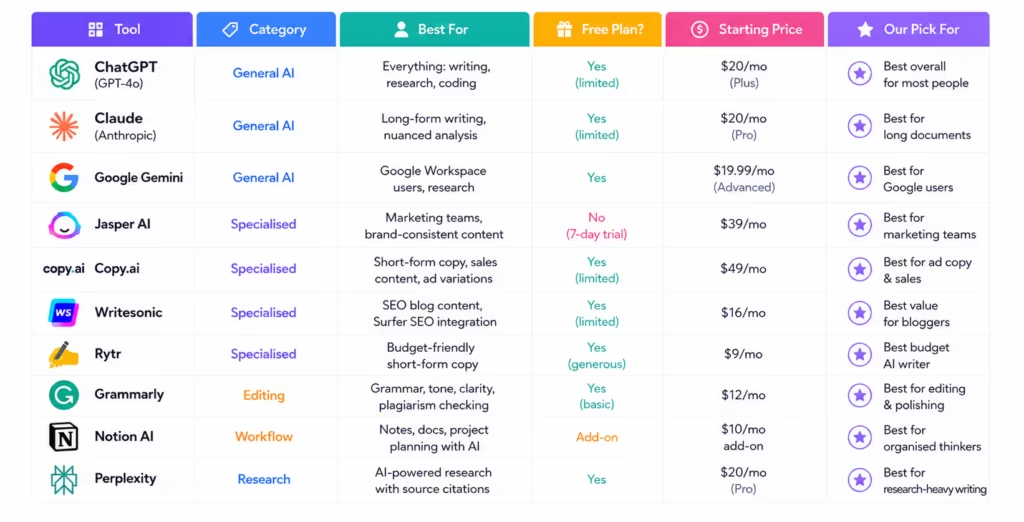
There are a lot of tools in this space. Before going deep on each one, here’s the full picture in one place, so you can see where everything sits before deciding where to focus.
A quick note on pricing: SaaS pricing changes frequently; always check the tool’s website before purchasing.
| Tool | Category | Best For | Free Plan? | Starting Price | Our Pick For |
|---|---|---|---|---|---|
| ChatGPT (GPT-4o) | General AI | Everything: writing, research, coding | Yes (limited) | $20/mo (Plus) | Best overall for most people |
| Claude (Anthropic) | General AI | Long-form writing, nuanced analysis | Yes (limited) | $20/mo (Pro) | Best for long documents |
| Google Gemini | General AI | Google Workspace users, research | Yes | $19.99/mo (Advanced) | Best for Google users |
| Jasper AI | Specialised | Marketing teams, brand-consistent content | No (7-day trial) | $39/mo | Best for marketing teams |
| Copy.ai | Specialised | Short-form copy, sales content, ad variations | Yes (limited) | $49/mo | Best for ad copy & sales |
| Writesonic | Specialised | SEO blog content, Surfer SEO integration | Yes (limited) | $16/mo | Best value for bloggers |
| Rytr | Specialised | Budget-friendly short-form copy | Yes (generous) | $9/mo | Best budget AI writer |
| Grammarly | Editing | Grammar, tone, clarity, plagiarism checking | Yes (basic) | $12/mo | Best for editing & polishing |
| Notion AI | Workflow | Notes, docs, project planning with AI | Add-on | $10/mo add-on | Best for organised thinkers |
| Perplexity | Research | AI-powered research with source citations | Yes | $20/mo (Pro) | Best for research-heavy writing |
A few things jump out from this table that are worth naming. First — seven of these ten tools have a free plan. That’s the starting point for most people, and it should be.
Second — the price difference between Rytr ($9/month) and Copy.ai ($49/month) is enormous. They’re not in the same league for features, but for a freelancer or student who mostly needs short-form content, Rytr does the job at a fraction of the price.
Third — none of the general AI assistants (ChatGPT, Claude, Gemini) are the most expensive options here, despite being arguably the most capable overall. The specialised tools cost more because of templates, integrations, and workflow features, not because the underlying AI is fundamentally better.
This matches what research into how millions of people actually use these tools shows — most everyday AI usage is practical and conversational, not the kind of high-volume branded content workflow that specialised tools are built around.
Best Free AI Writing Tools, Zero Cost, Real Value
The free AI writing tools available right now are better than most paid tools were a year ago. That’s not a knock on the paid options; it’s just the reality of how fast this space has moved.
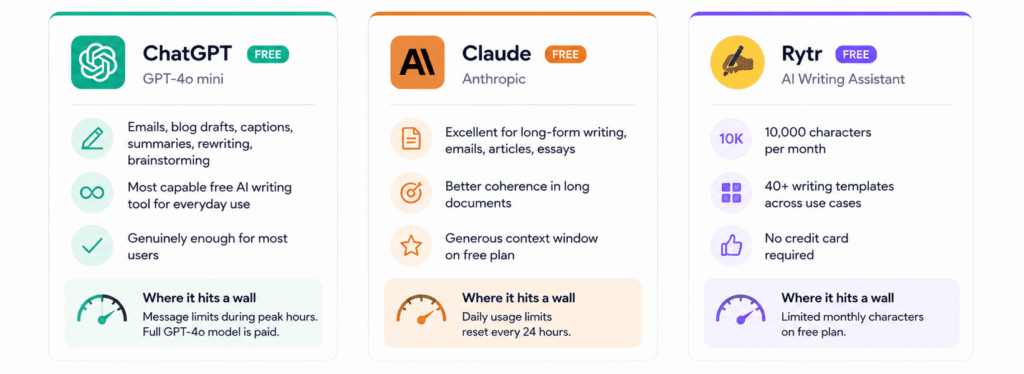
Here are three free AI writing tools worth actually using, with honest notes on what the free plan gives you and where it hits a wall.
ChatGPT Free (GPT-4o mini)
The most capable free AI writing tool most people will ever need. ChatGPT‘s free tier runs on GPT-4o mini, which can handle emails, blog drafts, social media captions, summarisation, rewriting, and brainstorming without breaking a sweat.
The ceiling you’ll hit: message limits during peak hours and access to the full GPT-4o model (faster, more capable) are behind the $20/month Plus plan. For the majority of casual and semi-regular users, the free tier is genuinely sufficient. Try the paid plan for a month if you’re hitting limits regularly, but don’t assume you need it from day one.
Claude Free (Anthropic)
Anthropic‘s Claude free tier is underrated, and in one specific area, it quietly outperforms ChatGPT’s free plan. For long documents. Long emails, long articles, long-form essays: Claude maintains coherence over extended text in a way that makes the output require less editing afterward.
The context window on the free plan is generous enough for most writing tasks. Where it hits a wall: daily usage limits that reset every 24 hours. If you’re a heavy daily user, you’ll feel that cap. If you use it a few times a week for substantive writing tasks, you may never hit it.
Rytr Free
Among the specialised AI writing tools, Rytr has the most generous free plan available, 10,000 characters per month, access to 40+ writing templates, and no credit card required to start.
That’s enough for several blog post drafts, a stack of social captions, or a consistent flow of short-form copy across a month. The free plan is real, usable, and not a bait-and-switch. The paid Saver plan starts at $9/month, one of the lowest prices in the specialised tools category.
For Indian users specifically, all three tools work reliably on standard Indian internet connections and mobile browsers. Rytr’s paid plans in INR start at approximately ₹750/month for the Saver plan — making it one of the most accessible paid AI writing tools for Indian creators, freelancers, and small business owners. ChatGPT Plus and Claude Pro are both available for Indian users.
Best AI Writing Tool for Blog Posts and Long-Form Articles
Long-form writing is where the differences between AI tools become most visible. For a 100-word social caption, almost any AI tool will give you something usable.
But when you ask a tool to write a 2,000-word article on a nuanced topic, maintaining a consistent argument, a consistent tone, and a structure that actually makes sense from introduction to conclusion, the gaps open up fast.
Here’s what separates the tools that handle long-form writing well from the ones that fall apart halfway through.
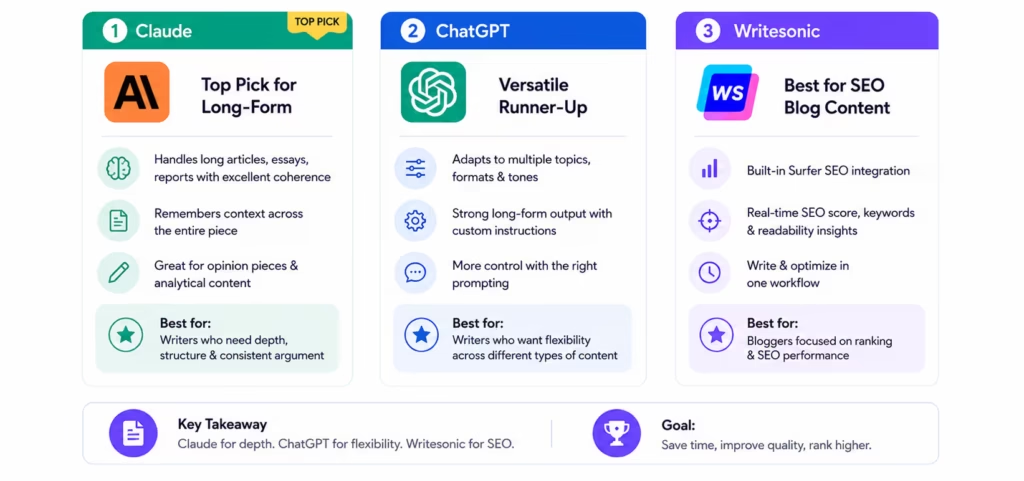
Claude: Top Pick for Long-Form
If you write long articles, essays, detailed reports, or in-depth guides, Claude is the best AI writing tool available right now for that specific job. The reason isn’t magic, it’s context.
Claude’s architecture handles longer pieces of text more coherently than most competitors. It remembers what it argued in paragraph two when it’s writing paragraph twelve. The output reads like something that was outlined before it was written, which saves significant editing time on the back end.
Where Claude particularly shines is in opinion writing and analytical content pieces that need to take a position and build a case, rather than just organising information. The default tone is clear and intelligent without being stiff. For bloggers writing in the “here’s what I think and why” tradition, it’s a strong fit.
ChatGPT with Custom Instructions: Versatile Runner-Up
ChatGPT is the better choice if you write across multiple topics, formats, and tones and want one tool that adapts to all of them. With well-crafted custom instructions (the system prompt feature that lets you set a permanent style guide), ChatGPT produces strong long-form content consistently.
The tradeoff is that it requires more upfront prompting investment to get good results. Claude tends to produce cleaner first drafts by default; ChatGPT gives you more control over the final output once you’ve figured out how to direct it.
“Sam Altman, CEO of OpenAI, has described ChatGPT’s role not as a replacement for human writers but as “a tool that helps people express themselves better.”
Writesonic: Best for SEO Blog Content Specifically
Here’s where Writesonic earns its place on this list despite being less capable than Claude or ChatGPT as a general writing tool. Its native integration with Surfer SEO lets you write and optimise content in the same workflow; you can see your keyword density, readability score, and SEO grade updating in real time as the AI generates text.
For bloggers who care primarily about ranking rather than literary craft, that combination of AI writing and real-time SEO feedback in one interface is a genuine time-saver. Writesonic’s starting price of $16/month also makes it one of the more accessible paid tools for individual creators and small content teams.
Best AI Copywriting Tools for Marketing, Ads, and Short-Form Content
Marketing copy is a different breed from blog writing. A blog post rewards depth and coherence.
But a Facebook ad headline rewards speed, variation, and the ability to test ten slightly different versions against each other to see which one converts. An email subject line lives or dies in the first three words. A product description needs to feel human and persuasive in forty words or fewer.
These are tasks where specialised AI copywriting tools genuinely earn their price tag over a general AI assistant, because the workflow they’re built around matches the way marketing actually works.
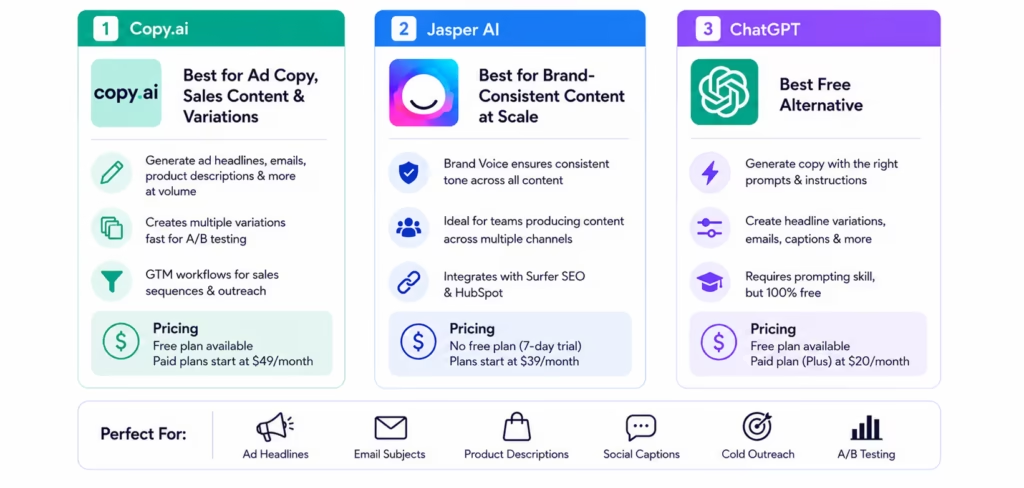
Copy.ai: Best for Ad Copy, Sales Content, and Variations
If your primary writing need is short-form copy at volume, ad headlines, email subject lines, product descriptions, social captions, cold outreach sequences – Copy.ai is the most purpose-built tool for that job.
The variation generation is where it really pulls ahead. Need twenty different versions of a Facebook ad headline to A/B test? Copy.ai generates them faster than any competitor, in a format that’s immediately usable rather than requiring significant editing.
Copy.ai’s GTM (Go-To-Market) workflow features also cover sales sequences, outreach templates, and lead nurturing copy, which makes it genuinely useful for small marketing teams handling the full funnel, not just content creation.
The free plan exists and is functional, though the usage limits make it more of a trial than a long-term free option. Paid plans start at $49/month, higher than Writesonic and Rytr, but the variation and workflow features justify it for teams producing copy at real volume.
Jasper AI: Best for Brand-Consistent Content at Scale
Jasper sits at a different price point and serves a different need from Copy.ai. Its Brand Voice feature is the standout: you upload examples of your existing content, style guide, and tone preferences, and Jasper applies that voice consistently across everything it generates — blog posts, ads, emails, social content.
For marketing teams where five people are producing content across multiple channels, that consistency is genuinely valuable and practically impossible to maintain manually at scale.
Jasper AI pricing starts at $39/month, which positions it as an enterprise-adjacent tool rather than a solo creator solution. It also integrates natively with Surfer SEO and HubSpot, useful for content teams already working inside those ecosystems.
The absence of a proper free plan (there’s a 7-day trial) means you’re committing before you’ve had enough time to fully evaluate it, which is a legitimate criticism.
Honestly? If you’re a solo marketer or freelance copywriter, start with Copy.ai or even a well-prompted ChatGPT before committing to Jasper’s price point. Jasper earns its keep for teams, plural, not for individuals.
ChatGPT: The Free Alternative That Punches Above Its Weight
For marketers on a budget, or anyone who hasn’t yet tried using ChatGPT specifically for copy, the gap between free ChatGPT and a $39–49/month specialised tool is smaller than the marketing for those tools would have you believe.
A well-constructed prompt asking for ten headline variations, with specific tone and character limit instructions, will produce usable output in under thirty seconds. The tradeoff is prompting skill; you need to know how to ask for what you want.
The specialised tools have that skill built into their templates. But it’s a learnable skill, and it’s worth learning before you commit to a monthly subscription.
Best AI Writing Tool for Students
Students have a complicated relationship with AI writing tools. And honestly, that complication is worth acknowledging directly rather than glossing over it.
The temptation to use them to write your assignments wholesale is real — especially at 1 am the night before a deadline. And most universities now use AI detection tools.
Turnitin, Copyleaks, and GPTZero are widely deployed across institutions. Getting flagged isn’t just an academic integrity risk — it can have consequences that follow you well beyond the submission.
“Andrej Karpathy, one of the founding researchers behind GPT, has publicly argued that AI homework detection is a battle institutions are unlikely to win long-term — but that doesn’t change the risk you’re taking this semester if you get flagged.”
More importantly, if you’re paying tuition to learn, using AI to think for you means you’re paying to have a machine get educated while you watch. That’s a bad deal by any measure.
If used correctly, AI writing tools are genuinely some of the most powerful study aids available to a student right now.
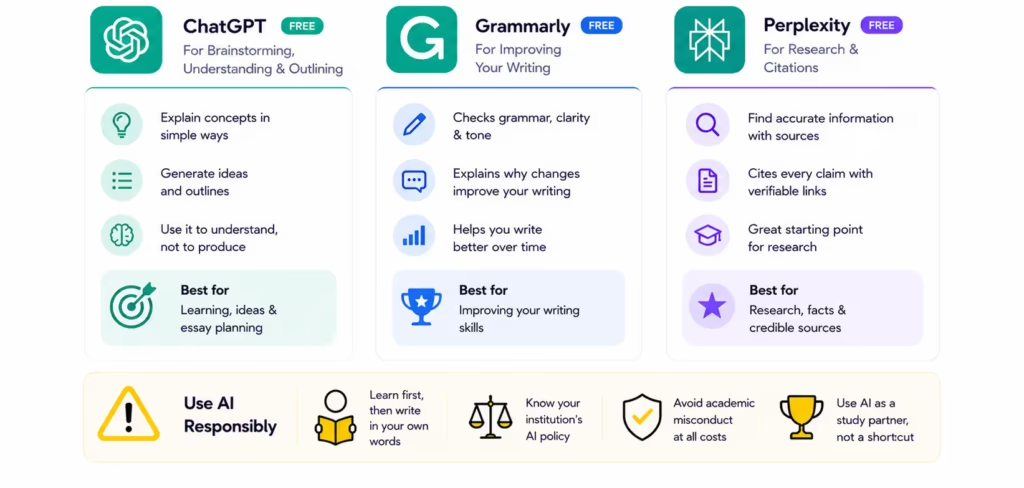
ChatGPT Free: For Brainstorming, Understanding, and Outlining
ChatGPT is most valuable to students not as a writer but as an explainer. Struggling to understand a concept from your textbook? Ask ChatGPT to explain it three different ways until one clicks.
Need to structure an essay but don’t know where to start? Ask it to generate five possible outlines for your topic, then pick the one that fits your argument and build from it yourself. Use it to understand, not to produce. The output is a starting point, your thinking, your argument, your words should drive the final submission.
Grammarly: For Improving Your Own Writing
Grammarly is the best AI writing tool for students who want to become better writers rather than just produce better-looking submissions, and that distinction matters. Unlike tools that generate text for you, Grammarly works on what you’ve already written.
It explains why a suggestion improves your sentence, not just what to change. Over time, those explanations actually change how you write, you start catching the patterns yourself before Grammarly flags them.
The premium plan adds plagiarism checking and more detailed tone suggestions, which are worth it for students writing frequently. The free plan covers grammar and basic clarity, which handle most everyday needs.
Perplexity: For Research and Citations
Here’s the tool most students aren’t using but should be. Perplexity is an AI-powered research tool that cites its sources, every claim it makes links back to a verifiable origin.
For research-based essays, that’s genuinely different from asking ChatGPT a factual question and hoping it’s right. You can ask Perplexity “what are the main arguments for and against universal basic income?” and get a structured summary with actual academic and journalistic sources attached.
That’s a research starting point, not a finished essay, but it’s a significantly better research starting point than an unverified ChatGPT response or a first-page Google search.
One honest note before moving on: if your institution has a specific AI use policy, read it before using any of these tools for assessed work. Policies vary enormously, some ban all AI use, some allow it with disclosure, some actively encourage it with guidelines. So know yours.
Best AI Writing Tool for Non-Native English Speakers
This is the section that doesn’t exist anywhere else on the internet right now. Every “best AI writing tools” article you’ll find is written by English-speaking Western writers, for English-speaking Western readers.
Nobody asks the question that’s actually relevant for hundreds of millions of AI users across India, Southeast Asia, the Middle East, and Africa: which AI writing tool works best when English isn’t your first language?
Why Standard AI Writing Tools Often Fall Short for Non-Native Writers
Most AI writing tools are trained on predominantly English-language Western content. The output reflects that, American idioms, Western cultural references, formal academic structures that feel natural to a native speaker but read like a translated document to everyone else.
The AI writes “correctly” in a technical sense, but the output can feel foreign in a way that’s hard to put your finger on.
For a non-native English writer, the challenge isn’t always generating text, it’s generating text that sounds natural and confident rather than technically correct but oddly stiff.
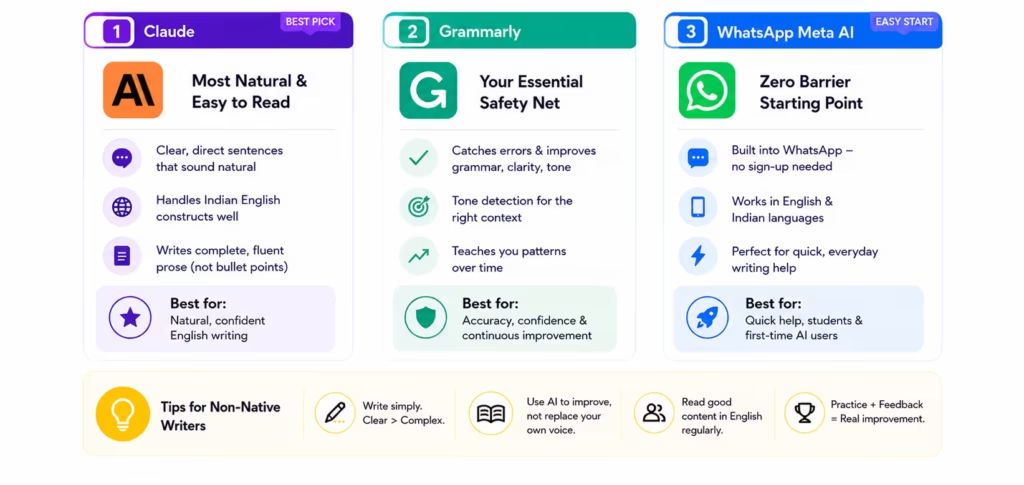
Claude: The Best Pick for Non-Native English Writers
Claude consistently produces cleaner, more naturally readable English output than most competitors, and critically, it requires less post-editing for non-native writers to turn into something that sounds genuinely fluent.
The style leans toward clear, direct sentences rather than the complex clause-heavy structures that are common in formal academic AI output.
It also handles Indian English constructions more gracefully than most tools, which matters when you’re writing in a register that sits somewhere between British English conventions and Indian professional communication norms.
For non-native writers specifically, Claude’s tendency to write in complete, readable sentences rather than bullet-pointed summaries also helps. The output is prose that sounds like a person wrote it, which is exactly what non-native writers need when they’re trying to sound natural rather than robotic.
Grammarly: The Essential Safety Net
For any non-native English writer, Grammarly is not optional. It’s necessity. Native speakers use Grammarly to catch errors. Non-native speakers use it to catch errors and to calibrate to develop an intuition for what “sounds right” in English when that intuition wasn’t built in childhood.
The tone detection feature is particularly useful: it flags when your writing sounds too formal, too casual, too uncertain, or too aggressive for the context, subtle signals that are easy to miss when you’re writing in a second language.
Over time, Grammarly’s suggestions teach you the patterns. After six months of serious use, most non-native writers find they’re catching errors themselves before Grammarly flags them. That’s not dependency, that’s learning.
WhatsApp Meta AI, The Zero-Barrier Starting Point for Indian Users
Here’s one that surprises people. Meta AI is now built directly into WhatsApp, the app that hundreds of millions of Indian users already have on their phones and open dozens of times a day.
For quick, everyday writing tasks, drafting a professional message, summarising a document, improving a piece of text you’ve already written, Meta AI in WhatsApp is a zero-cost, zero-sign-up, zero-friction starting point. It works in English and several Indian regional languages. It doesn’t require a laptop or a new account. It’s just there.
It won’t replace Claude or Grammarly for serious writing work. But for the student or professional who’s never tried an AI writing tool before and isn’t sure where to start, opening WhatsApp Meta AI and asking it to help rewrite a message is a more accessible entry point than signing up for a new platform, verifying an email, and navigating an unfamiliar interface.
“As Sundar Pichai, CEO of Google, noted in a discussion about AI accessibility: “The goal is to make AI helpful for everyone, not just those who can afford it or have access to the latest devices.“
ChatGPT vs Claude vs Jasper: Which Is Actually Better for Writing?
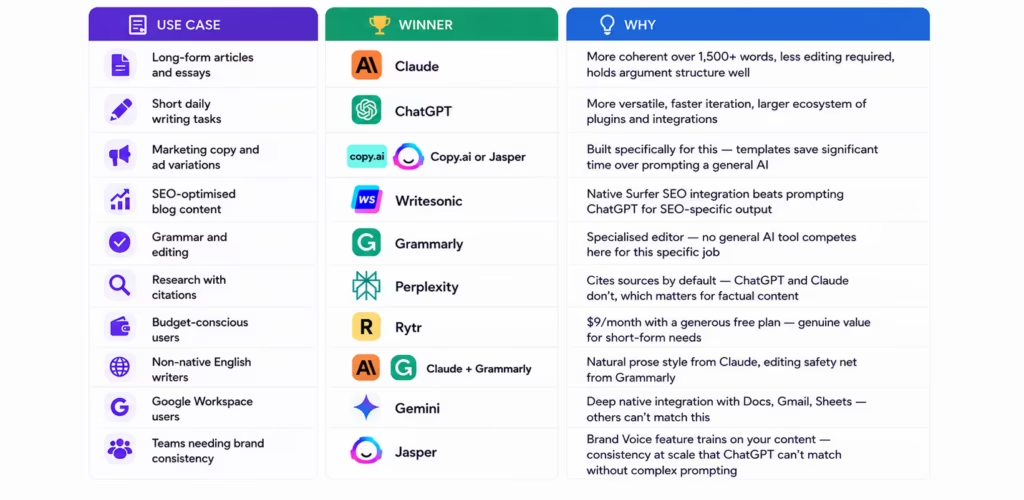
Here’s the question everyone has after looking at a comparison table. Not “which tool has the most features” — that answer is usually Jasper. Not “which tool is cheapest” — that’s Rytr.
But specifically, between the three tools that dominate this conversation, which one actually produces better writing for the thing you need to do?
The honest answer is that it depends — but not in a vague, unhelpful way. Each tool genuinely wins in specific situations, and the distinctions are clear enough to be actionable.
| Use Case | Winner | Why |
|---|---|---|
| Long-form articles and essays | Claude | More coherent over 1,500+ words, less editing required, holds argument structure well |
| Short daily writing tasks | ChatGPT | More versatile, faster iteration, larger ecosystem of plugins and integrations |
| Marketing copy and ad variations | Copy.ai or Jasper | Built specifically for this — templates save significant time over prompting a general AI |
| SEO-optimised blog content | Writesonic | Native Surfer SEO integration beats prompting ChatGPT for SEO-specific output |
| Grammar and editing | Grammarly | Specialised editor — no general AI tool competes here for this specific job |
| Research with citations | Perplexity | Cites sources by default — ChatGPT and Claude don’t, which matters for factual content |
| Budget-conscious users | Rytr | $9/month with a generous free plan — genuine value for short-form needs |
| Non-native English writers | Claude + Grammarly | Natural prose style from Claude, editing safety net from Grammarly |
| Google Workspace users | Gemini | Deep native integration with Docs, Gmail, Sheets — others can’t match this |
| Teams needing brand consistency | Jasper | Brand Voice feature trains on your content — consistency at scale that ChatGPT can’t match without complex prompting |
Claude wins more individual categories than people expect, it’s still underrated relative to its actual quality. ChatGPT wins the versatility and ecosystem category, which matters more for some workflows than output quality per task.
And Jasper only earns its $39/month price point in two specific scenarios: large marketing teams and brand-consistency requirements. For everything else, it’s genuinely hard to justify over the cheaper or free alternatives.
One more thing. You’ll notice the table includes tools beyond the “big three” of ChatGPT, Claude, and Jasper — because the honest answer to “which is best for writing?” frequently isn’t one of those three at all.
For SEO content, Writesonic beats them. For citations, Perplexity beats them. For grammar, Grammarly beats them. The right tool depends entirely on the job.
“As Dario Amodei, CEO of Anthropic, said: “We want Claude to be genuinely helpful — not helpful in a watered-down, hedge-everything way, but genuinely, substantively helpful in ways that make real differences in people’s lives.”
What AI Writing Tools Can’t Do, The Honest Part
Every “best AI writing tools” list is relentlessly positive. Glowing ratings, impressive feature breakdowns, enthusiastic verdicts. Nobody tells you what these tools genuinely can’t do.
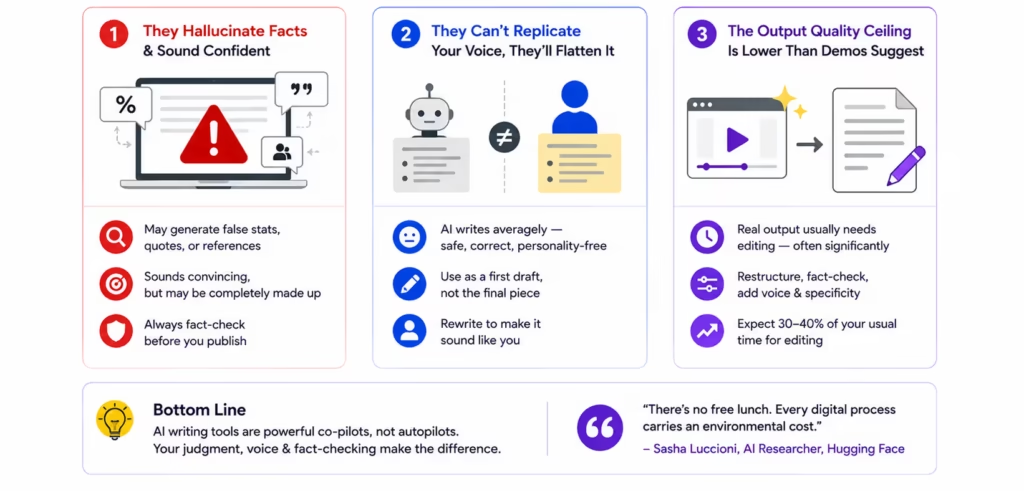
That’s a problem — because going in with accurate expectations is the difference between using AI writing tools effectively and feeling frustrated and ripped off after a month. So here’s the three honest limitations.
They Hallucinate Facts, and Sound Completely Confident Doing It
AI writing tools don’t look things up. They generate text based on patterns learned during training — and sometimes those patterns produce plausible-sounding statistics, quotes, case studies, and references that simply don’t exist.
ChatGPT will cite a research paper with a convincing title, author name, and journal, and that paper may never have been published anywhere. Jasper will generate a customer testimonial that reads as authentic but was fabricated entirely. And Claude will state a percentage confidently that has no verified source behind it.
This isn’t a bug that’s getting patched. It’s a fundamental characteristic of how these models work. Newer versions hallucinate less — but they all still hallucinate.
Which means a firm rule: verify any specific factual claim an AI writing tool produces before publishing it. Statistics, dates, attributed quotes, research findings, company data, all of it needs a second source. Always.
They Can’t Replicate Your Voice, They’ll Flatten It
AI writes averagely. That’s not an insult — it’s a technical description of what’s happening. These models produce text that represents the statistical average of everything they were trained on.
The output is grammatically correct, structurally sound, and almost completely devoid of genuine personality. If your writing is one of your competitive advantages, if readers come back because of how you see things, not just what you’re covering, AI output will flatten that.
It’ll produce something that sounds like a reasonably competent writer wrote it, which is a different thing from sounding like you wrote it.
The tools above are best used as first-draft generators that you then shape into something genuinely yours. The drafts they produce are raw material, not finished work. The writers who get the most value from AI tools are the ones who treat AI output as a starting point, and then rewrite aggressively.
The Output Quality Ceiling Is Lower Than the Demos Suggest
Marketing demos for AI writing tools show polished, publication-ready content generated in thirty seconds. Real-world output usually needs editing. Sometimes significant editing, restructuring arguments, rewriting transitions, fact-checking claims, injecting personality and specificity that the AI left out.
Budget time for that in your workflow. The time saving is real, having a rough first draft to react to is meaningfully faster than building from a blank page, but it’s not as dramatic as the demos make it look.
Expect to spend 30–40% of your usual writing time on editing AI output into something you’d actually put your name on. That’s still a net gain. Just not the 90% time reduction some tools imply.
“Sasha Luccioni, AI climate researcher at Hugging Face and one of TIME Magazine’s 100 most influential people in AI, said it well when she noted: “There’s no free lunch. Every digital process carries an environmental cost.”
The carbon cost of running AI writing tools at scale is real and measurable — we covered it model by model, including ChatGPT, Gemini, and reasoning models, in our AI carbon footprint guide
How to Pick the Right AI Writing Tool for You
You’ve seen the tools. You’ve seen the comparisons. Now here’s the part that actually matters — a straight answer for your specific situation, without hedging.
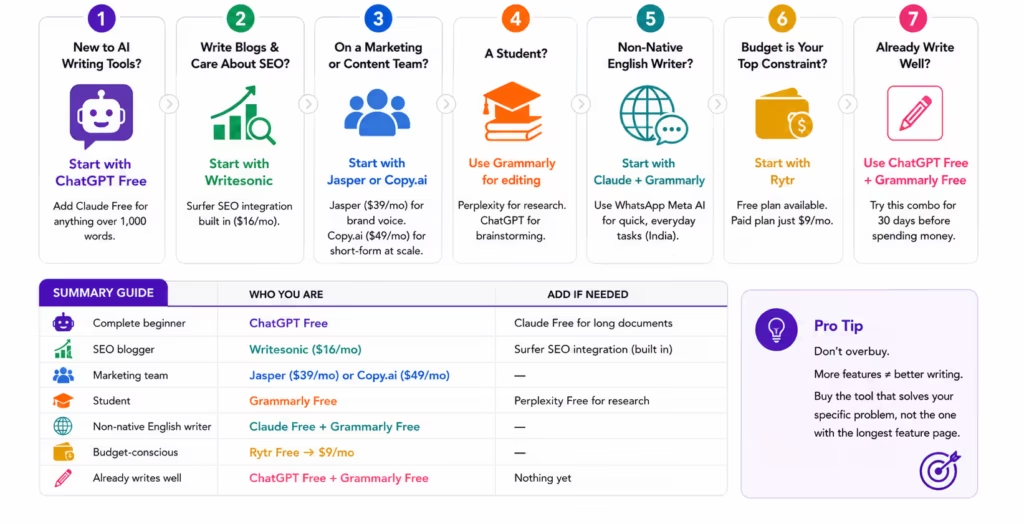
Think of this as a decision tree. Find the line that describes you, and that’s your starting point.
If you’re completely new to AI writing tools:
Start with ChatGPT free. It handles 90% of writing tasks without payment, emails, blog drafts, social captions, brainstorming, editing, and summarising. Add Claude free for anything over 1,000 words, where it consistently outperforms ChatGPT’s free tier.
Do not pay for anything until you’ve genuinely run out of what free tools can do. Most people take longer than they expect to hit that ceiling.
If you write blog content and care about SEO ranking:
Writesonic with Surfer SEO integration. The combination of AI-generated first drafts and real-time SEO optimisation in one workflow saves meaningful time compared to writing in one tool and optimising in another.
At $16/month, it’s the best value paid tool for individual bloggers and small content operations.
If you’re on a marketing or content team:
Jasper AI for brand voice consistency and content at scale, or Copy.ai for high-volume short-form copy and ad variations. The higher price makes sense when multiple team members are using the tool daily, the per-seat cost comes down, and the time savings compound across a team. Don’t buy either for a single user who’s producing occasional content.
If you’re a student:
Grammarly for editing your own writing and developing better habits. Perplexity for cited research. ChatGPT for brainstorming and understanding concepts.
Do not use any AI tool to write your assignments, the academic integrity risk is real, and more importantly, you’re the one who loses when a machine does your thinking.
If you’re a non-native English writer:
Claude for the writing itself, cleaner, more natural English output with less post-editing required. Grammarly as your permanent editing layer, it’s not optional for this use case, it’s infrastructure. WhatsApp Meta AI for quick everyday tasks if you’re in India and want a zero-friction starting point that costs nothing.
If budget is genuinely your primary constraint:
Rytr at $9/month is the best value paid AI writing tool in this category, with a genuinely usable free plan to start. For short-form content, social captions, product descriptions, email drafts, short blog sections, it delivers more than its price suggests.
The free plan offers 10,000 characters per month, which is enough to evaluate whether the tool fits your workflow before committing.
If you already write well and just want to write faster:
This one is genuinely underappreciated: you might not need a paid AI writing tool at all. A well-crafted system prompt in ChatGPT free, combined with Grammarly’s free tier for editing, covers the workflow of a large number of professional writers who think they need something more. Try that combination for thirty days before spending money.
Here’s the summary version — because sometimes you just need a table:
| Who You Are | Start With | Add If Needed |
|---|---|---|
| Complete beginner | ChatGPT free | Claude free for long documents |
| SEO blogger | Writesonic ($16/mo) | Surfer SEO integration (built in) |
| Marketing team | Jasper ($39/mo) or Copy.ai ($49/mo) | — |
| Student | Grammarly free | Perplexity free for research |
| Non-native English writer | Claude free + Grammarly free | — |
| Budget-conscious | Rytr free → $9/mo | — |
| Already writes well | ChatGPT free + Grammarly free | Nothing yet |
The most common mistake in this category is overbuying. People see the feature list for Jasper or Copy.ai and assume more features mean better writing.
It doesn’t. It means more templates and more workflow integrations — which matter a lot for some use cases and not at all for others. Buy the tool that solves your specific problem, not the one with the longest feature page.
Conclusion
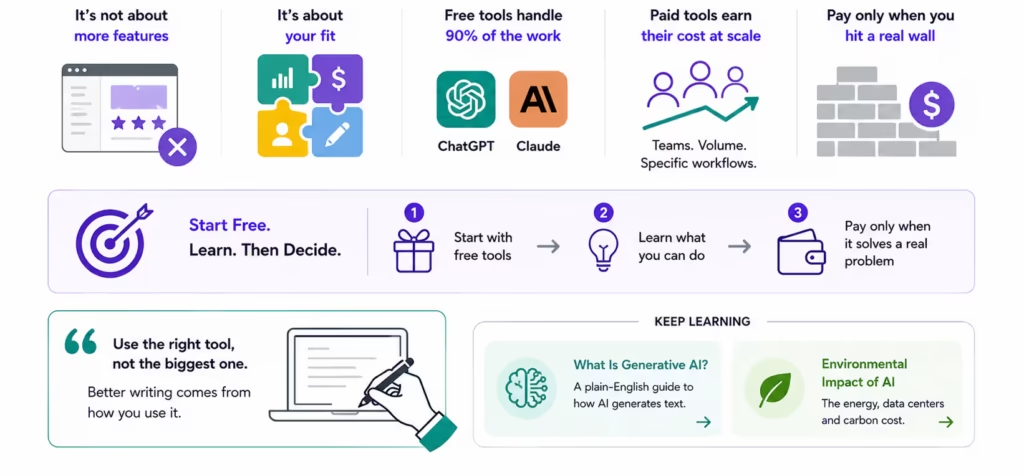
The best AI writing tool isn’t the one with the most features. It isn’t the most expensive one, or the one that shows up first in search results, or the one with the most impressive demo video. It’s the one that fits how you actually work — your volume, your budget, your skill level, and the specific type of writing you do most.
For most people reading this, that tool is ChatGPT or Claude on a free plan. Full stop. The gap between free general AI assistants and paid specialised tools is real but narrow for individual users — and it’s getting narrower every few months as the free tiers improve.
The paid specialised tools — Jasper, Copy.ai, Writesonic, earn their cost in specific, identifiable situations: marketing teams producing content at scale, bloggers who need SEO optimisation baked into the writing workflow, copywriters generating hundreds of variations for A/B testing. Outside those situations, the premium is hard to justify when free tools handle the same job with a bit more prompting effort.
Start free. Learn what you can do with the tools that cost nothing. When you genuinely run into a wall, when you’re losing time, losing quality, or losing consistency in a way that a paid tool would fix, that’s the moment to pay. Not before.
If you’re still building your understanding of what these tools actually are under the hood, how they generate text, why they hallucinate, what large language models actually do — our guide to what is generative AI is the right place to start.
And if you want to understand the environmental cost of running all this AI infrastructure the energy, the data centers, the carbon — we covered that in full in our environmental impact of AI guide.
And if you want the other side of that story, where AI is being used to actually fight climate change through wildfire detection, cleaner energy grids, and methane monitoring — our green AI guide covers what’s genuinely working.
FAQs
Is there an AI writing tool that can write an entire book?
Yes, tools like Claude, ChatGPT, and Sudowrite can help write an entire book, but they work best as writing assistants rather than ghostwriters. They can generate outlines, develop chapters, improve dialogue, and overcome writer’s block. However, you’ll still need to edit the manuscript for consistency, accuracy, and your personal writing style.
Which AI writing tool has the least AI-sounding output?
Claude generally produces the most natural and human-like long-form writing, especially for essays, articles, and opinion pieces. ChatGPT can achieve similar results with well-crafted prompts and custom instructions, while Grammarly helps polish AI-generated text into more natural writing.
How often do AI writing tools update their knowledge?
It depends on the platform. Some AI tools rely primarily on their training data, while others can access live web information or connected search features.
Which AI writing tool offers the best value for money?
For most individuals, ChatGPT Free or Claude Free provide the best overall value because they handle a wide variety of writing tasks without a subscription. Among paid options, Rytr offers one of the most affordable plans, while Writesonic provides strong value for bloggers focused on SEO.
Which AI writing tool is best for SEO?
For SEO-focused content, Writesonic stands out because of its built-in Surfer SEO integration. However, many bloggers also successfully use ChatGPT or Claude alongside separate SEO tools like Surfer SEO or Ahrefs.
Which AI writing tool is best for freelancers?
Freelancers usually get the best value from ChatGPT or Claude because they handle multiple writing tasks. If freelance work focuses heavily on advertising or sales copy, Copy.ai can be a worthwhile upgrade.

Jigar Chaudhary is the Editor-in-Chief at UrviumAI, where he oversees coverage of artificial intelligence news, tools, and in-depth studies. With over 5 years of experience analyzing AI and robotics, he focuses on maintaining high editorial standards, accurate reporting, and clear explanations to help readers understand how AI is shaping the future.